
AI vs OCR for Invoice Processing: What Your AP Team Should Choose
Alok Mani · · 13 min read · Automation
Share: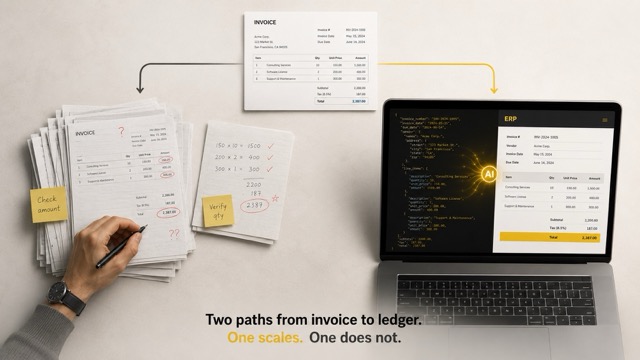
Most AP teams in 2026 are not choosing between AI and OCR.
They are choosing between an old OCR system that almost works, a new AI tool that promises everything, and the spreadsheet on Priya's laptop that quietly runs the entire month-end close.
This is the real state of invoice processing.
The vendor pitches sound clean. The reality on the ground is messy. And the gap between what a demo shows and what your AP team actually deals with is where most automation projects go to die.
If you are an AP head, a finance controller, or a CIO trying to decide what to put behind your accounts payable function, this piece is for you. We are going to skip the brochure language and talk about what OCR actually does, what AI actually does, and where each one breaks.
What OCR was built for, and why that matters
Optical Character Recognition is older than most of the people running AP teams today. It was designed to do one thing: convert pixels of text into machine readable characters.
That is it.
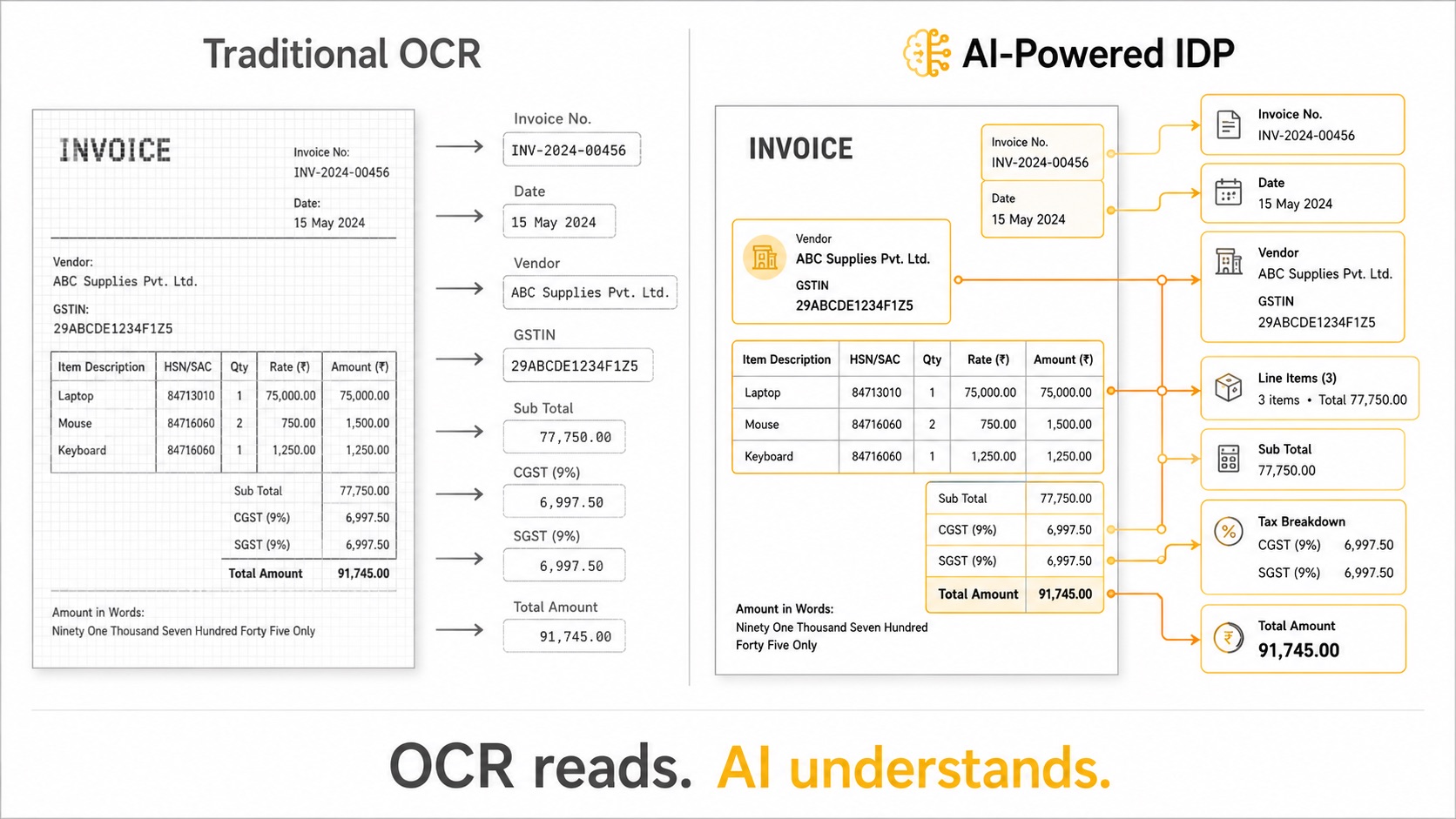
OCR does not understand what an invoice is. It does not know that "Vendor Name" is different from "Bill To". It does not know that an 8 digit number near the word "HSN" is a tax code and an 8 digit number near the word "Invoice" is a document reference.
To make OCR useful for invoice processing, you have to build a layer on top of it. That layer is usually one of two things:
- Templates. You map field positions for each vendor format. "GST number is at coordinates X, Y for Vendor A. Invoice number is at X, Y for Vendor B."
- Rules. You write logic that says "if the text near this keyword looks like a date, treat it as the invoice date."
Both approaches work. Both approaches break the moment a vendor changes their invoice format. And vendors change their invoice formats more often than anyone in procurement wants to admit.
I have seen finance teams maintain over 200 templates for a single OCR system. Half of them stop working in any given quarter. Someone in IT gets a ticket. Someone in AP waits three days. The invoice gets keyed in manually anyway.
This is the OCR reality nobody puts in a pitch deck.
OCR sees characters. It does not see meaning. That gap is where AP teams lose their weekends.
Why OCR fails on unstructured invoices
The phrase "unstructured invoice" sounds technical. It is not. It just means an invoice that does not follow a fixed layout.
Which is most invoices.
Here is what real Indian invoices look like in 2026:
- A scanned PDF from a small vendor where the GST number is handwritten in one corner
- A multi page document where line items spill across pages with no clean break
- An e-invoice from a large supplier with a QR code, an IRN, and a layout that changes every quarter
- A bilingual invoice with English headers and Hindi line items
- A photocopied bill where the bottom 20 percent is faded
OCR was trained for clean, printed, English text on a flat layout. It does well on a Word document printed to PDF. It struggles the moment a document deviates from that pattern.
The dirty number that vendors rarely quote: traditional OCR delivers around 80 percent field level accuracy on real business invoices. That sounds high until you do the math.
500 invoices per month. 20 fields per invoice. 80 percent accuracy means 2,000 incorrect fields every month. Each one needs a human to find it and fix it.
You have not automated invoice processing. You have built a digital assembly line where humans correct the machine.
What AI-Powered IDP actually does differently
AI-Powered IDP, or Intelligent Document Processing, is not better OCR. It is a different category.
OCR reads pixels. AI reads documents.
The difference matters because invoice processing is not a reading problem. It is an understanding problem.
When a human accountant looks at an invoice, they do not scan left to right top to bottom. They scan for context. They see the layout, recognise the vendor, find the totals, check the GST breakdown, match it against the purchase order in their head. They do all of this in seconds because they understand what an invoice is and what each field means in relation to the others.
AI-Powered IDP does the same thing.
It uses large language models and vision transformers to process text, layout, and visual elements together. It understands that a 15 digit alphanumeric near the word "GSTIN" is a GST number, whether it appears in the top right, bottom left, or middle of the page. It understands that line items relate to totals, that CGST and SGST should add up to a specific figure, that the date format might be DD/MM/YYYY or DD-MM-YY but it is still a date.
This is what context aware extraction means.
RPATech wrote a detailed piece on context-aware AI document extraction if you want to go deeper on the underlying tech.
The accuracy gap is not 10 percent. It is the difference between automation and theatre
Let me be specific about numbers because vague claims help nobody.
Traditional OCR on complex Indian invoices typically delivers field level accuracy in the 75 to 85 percent range, depending on document quality and how much template maintenance has been done.
AI-Powered IDP solutions built specifically for Indian invoices, like RPATech's DocXtract, are delivering 95 to 98 percent field level accuracy on real production documents. Not test datasets. Real invoices from real vendors.
So the gap is roughly 15 to 18 percentage points. That sounds incremental. It is not.
Here is why.
At 80 percent accuracy, every batch needs a human reviewer. The AP team becomes an error correction team. The automation never reaches the level of trust required for straight through processing.
At 98 percent accuracy, you can route most invoices directly to your ERP. You only escalate the 2 percent the system flags with low confidence. The team shifts from data entry to exception handling, which is a much smaller job.
The difference between 80 and 98 is not 18 percentage points of accuracy. It is the difference between needing a 12 person AP team and needing a 3 person AP team. It is the difference between automation that pays for itself in 6 months and automation that quietly costs more than the manual process it replaced.
We covered the speed and accuracy trade-off in detail here if you want the longer breakdown.
The gap between 80 percent and 98 percent accuracy is not incremental. It is the difference between automation theatre and an AP function that actually scales.
Where AI is genuinely better than OCR
Let me list this out cleanly, because the marketing language around AI tends to blur the specifics.
1. New vendor formats. OCR needs a new template. AI handles it on day one because it understands what an invoice is, not just what a specific invoice looks like.
2. Handwritten and stamped content. Notes from the receiving team, approval stamps, handwritten amendments. OCR struggles. AI reads it in context.
3. Multilingual content. Indian invoices often mix English with regional languages. Most OCR engines were trained on English and add other languages as an afterthought. Modern multimodal AI handles this natively.
4. Field relationships. OCR can extract numbers. AI can validate that the sum of CGST and SGST equals the total tax, flag the discrepancy if it does not, and tell you which line item is causing the mismatch.
5. Compliance context. AI trained on Indian invoices understands GST structure, HSN codes, IRN formats, and e-invoicing requirements. It does not treat them as random text.
6. Self correction. Good AI systems learn from your corrections. Every error you fix improves the next batch. OCR plus templates does not learn. It just waits to be reconfigured.
Where OCR still has a role
I should be honest about this. AI is not always the right answer.
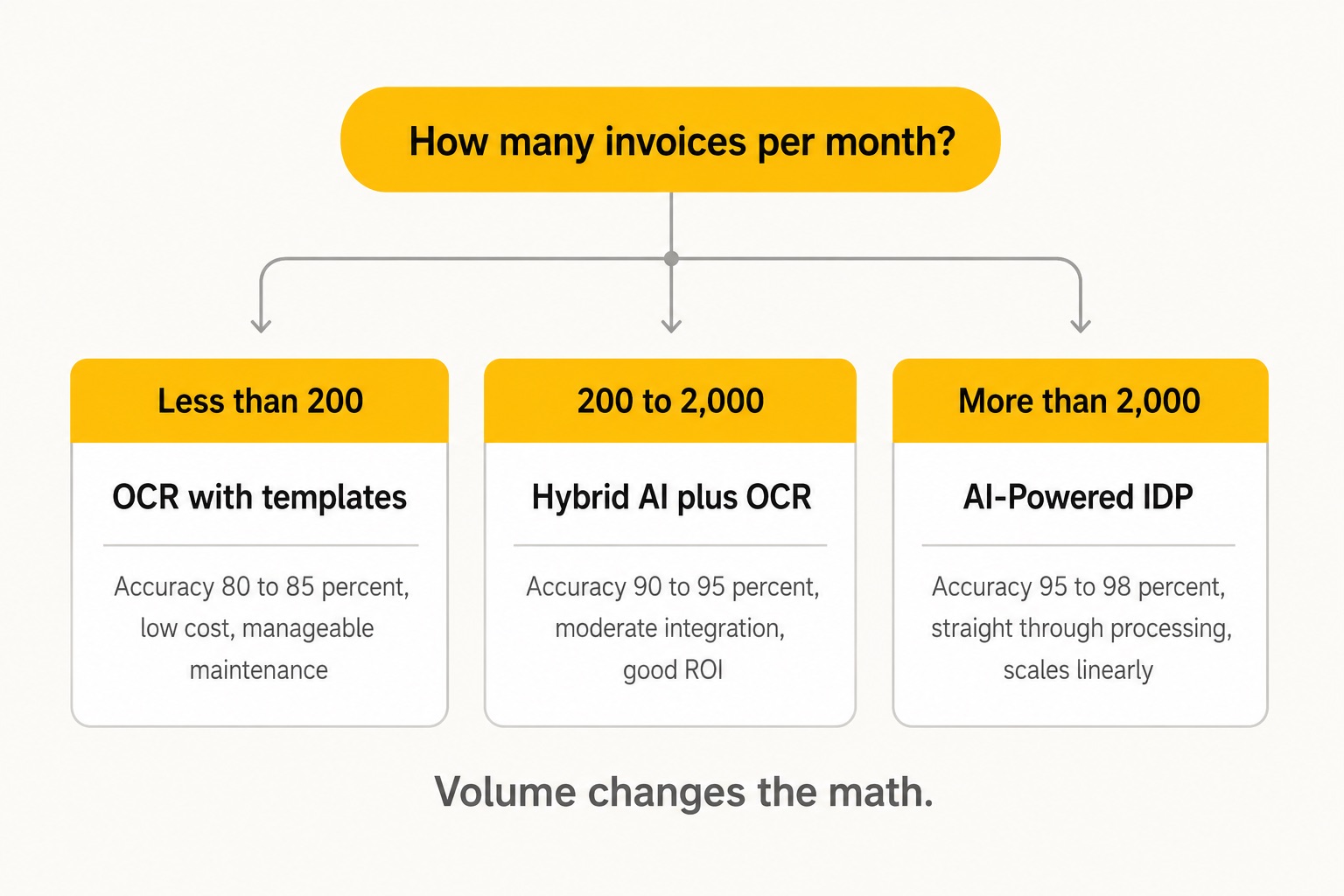
If you process a small volume of invoices, all in a single format, from a stable set of vendors, OCR with templates might be cheaper and simpler. The break-even point is roughly 1,000 invoices per month or 30 plus vendor formats. Below that, the operational overhead of a full AI system might not pay back.
Also, if your invoices are already digitally generated PDFs with a consistent structure, like e-invoices that are pulled directly from the GSTN portal, you do not really need either. You can parse the structured XML directly.
The AI versus OCR debate matters most when you are dealing with the messy middle: hundreds of vendors, mixed formats, scanned and digital documents, and a finance team that is drowning.
What this means for your AP team
If you are running an AP function in an Indian enterprise in 2026, here is the practical framing.
You are not choosing between OCR and AI in a vacuum. You are choosing between:
- Status quo (manual entry with some OCR help)
- Template-based OCR with rule layers
- AI-Powered IDP with API integration
Each of these has different costs, different break points, and different operational implications.
Status quo is invisible cost. You do not see a line item for it, but it shows up as overtime, payment delays, vendor disputes, and audit findings.
Template-based OCR works for stable, low variance environments. The hidden cost is template maintenance, which scales linearly with vendor count.
AI-Powered IDP works for high variance, high volume environments. The upfront integration is real but small. The output is structured data that flows directly into your ERP without human intervention on most invoices.
For most BFSI, healthcare, and manufacturing clients we work with at RPATech, the math points clearly to AI-Powered IDP at the volumes they process. For smaller operations, a hybrid approach often makes sense: OCR for the predictable formats, AI for the unstructured pile that breaks the templates.
What we got wrong building DocXtract
I want to share something honest here, because most automation content avoids it.
When we started building DocXtract, our first version was heavy on rules. We thought we could codify the logic of Indian invoice extraction. GST is structured. HSN codes follow patterns. Tax calculations are mathematical. Why not encode all of it?
We spent months on rule engines. Hundreds of conditions.
The system worked beautifully in our test environment. Then we gave it real invoices from real clients.
It failed about 40 percent of the time.
Real documents do not follow rules. They follow chaos. Every rule we wrote had three exceptions we had not thought of. Every exception had its own edge cases.
So we threw most of it out and rebuilt the core around AI models that learn from examples rather than rules that codify logic. That is when accuracy moved from 70 something to 95 plus on real production documents.
If you are evaluating AI versus OCR vendors, ask them this one question: "What is your accuracy on documents your model has never seen before, from a vendor format that is not in your training data?"
If they cannot answer with a real number, you have your answer.
The full story is here: why we built DocXtract.
So what should your AP team actually choose?
Here is the short version, with no hedging.
If your AP function is processing more than a few hundred invoices a month, with more than 10 vendor formats, and you care about straight through processing, choose AI-Powered IDP. Templates and rules will cost you more in maintenance than they save in licence fees.
If you have a small, stable AP function with predictable vendors, OCR with light rules might be enough. Do not over engineer it.
If your invoices are already digitally generated, neither AI nor OCR is the right tool. Use structured parsing.
The honest truth is that the AI versus OCR debate is mostly settled at the enterprise scale. The question is no longer whether AI is better. The question is which AI provider actually understands your document reality, can deliver the integration, and will be around in three years to support what they sold you.
That is the real evaluation. The technology is the easy part. The vendor selection is the hard part.
If you want to see what production-grade AI-Powered IDP looks like on Indian invoices, DocXtract is the place to start. We built it because we got tired of watching OCR break the same way at every client.
The companies that figure this out in 2026 will close their books faster, pay vendors on time, and audit with confidence.
The ones that keep adding templates will keep losing weekends.
FAQ
Why does OCR fail on unstructured invoices?
OCR reads pixels into characters but does not understand what an invoice is. The moment a vendor changes the layout, the templates and rules built on top of OCR break. Real invoices vary in format, language, quality, and structure, which is why field-level OCR accuracy drops to around 80 percent on production documents.
How is AI better than traditional OCR for invoice processing?
AI-Powered IDP uses large language models and vision transformers to read documents the way a human accountant does, understanding layout, context, and relationships between fields. It handles new vendor formats, multilingual content, handwritten notes, and complex tax structures without needing templates or rule maintenance.
What is the typical AI invoice processing accuracy rate?
Modern AI-Powered IDP solutions built for Indian invoices deliver 95 to 98 percent field-level accuracy on real production documents. Traditional OCR typically lands in the 75 to 85 percent range, depending on document quality and template maintenance.
Should small AP teams switch from OCR to AI?
Not always. If you process fewer than a few hundred invoices a month from a stable set of vendors with consistent formats, OCR with light rules can still be cheaper and simpler. AI-Powered IDP makes sense once volume, vendor variety, and format chaos cross a threshold, typically 200 invoices a month with more than ten vendor formats.
What are the main limitations of OCR in invoice processing?
Template maintenance overhead, poor handling of handwritten or stamped content, weakness on multilingual documents, inability to validate field relationships, and no learning from corrections. Every new vendor format adds operational cost rather than being absorbed by the system.