
Why Document Processing Remains the Biggest Unsolved Problem in Enterprise Automation
DocXtract Team · · 9 min read · Intelligent Document Processing
Share: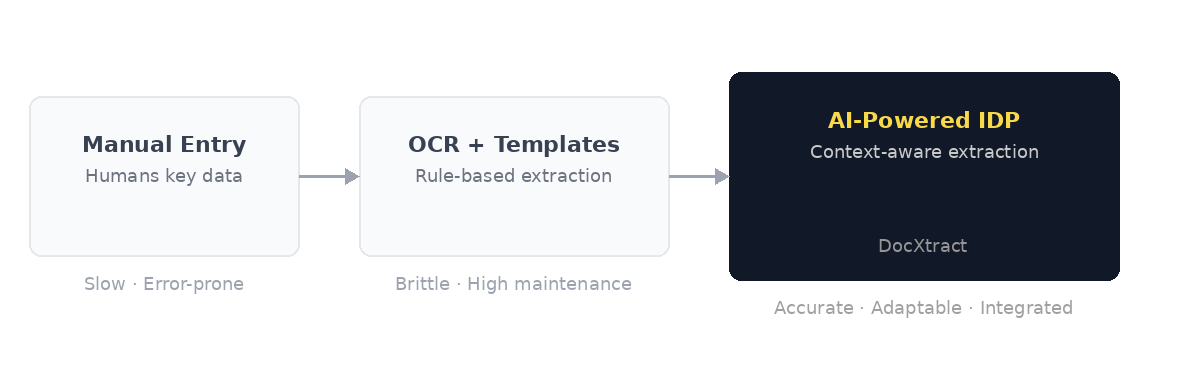
Most enterprises in 2025 have automated payroll, procurement approvals, and fraud detection. Yet in most of those same enterprises, someone is still manually typing invoice data into SAP. Someone is still printing a loan application, stamping it, scanning it, and emailing the PDF to a colleague.
This is not a problem confined to laggard industries. It is the dominant bottleneck inside the automation programmes of the world's most sophisticated organisations. The question worth asking is not why companies have not automated document processing yet. They have tried. Many have tried repeatedly. The real question is: why does it keep failing?
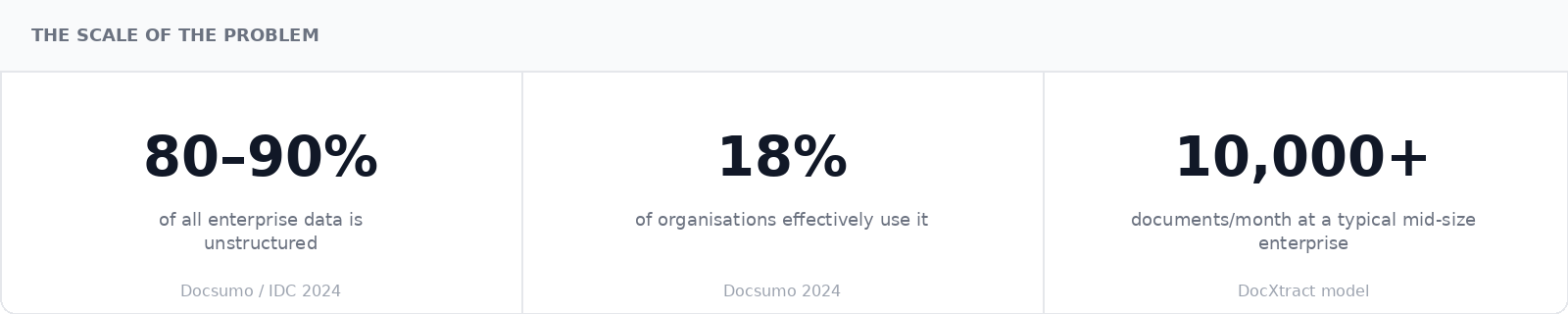
The scale of the problem
Three eras. The same problem.
Enterprise document processing has evolved through three distinct eras. Each one improved on the last. Each one broke on the same underlying challenge: documents are inherently variable and unstructured, and no fixed-rule system handles that at scale.
| Approach | How it works | Where it breaks | Result |
|---|---|---|---|
| Manual entry | Humans read documents and key data into systems | Volume. Every additional document requires more headcount. | Does not scale |
| OCR + templates | Pixels converted to text. Template layers map fields per vendor format. | Format variation. A single layout change breaks the template. | Brittle |
| AI-Powered IDP | Language models read documents with contextual understanding. No templates needed. | Integration gaps in most tools. DocXtract solves this with pre-built connectors. | ✓ DocXtract |
Why document processing is structurally hard
Strip away the technology layers and the core challenge becomes clear. Solving document processing requires three things simultaneously. Most solutions only deliver two of them.
- Accuracy. Not approximately correct. Correct. Every extraction error is a potential compliance failure: a wrong account number in a payment run, a misread quantity on a purchase order, an incorrect field on a KYC form, a missed date on a shipping document.
- Adaptability. The system must handle documents it has never seen before. New vendors, new formats, new layouts, without retraining or reconfiguration every time a layout changes.
- Integration. Extracted data must flow directly into SAP, Finacle, Temenos, or the relevant ERP without a human manually copying it across. Extraction without integration just moves the bottleneck.
OCR delivers partial accuracy but breaks on adaptability. Templates give structure but fail on variation. General-purpose AI gives adaptability but almost universally lacks native integration. DocXtract is built to deliver all three.
The OCR reality nobody puts in a pitch deck
Optical character recognition was designed to do one thing: convert pixels of text into machine-readable characters. It does not understand what an invoice is. It does not know that "Vendor Name" is different from "Bill To", or that an 8-digit number near the word "HSN" is a tax code while an 8-digit number near the word "Invoice" is a document reference.
To make OCR useful for invoice processing, you have to build a layer on top of it. Either templates that map field positions per vendor, or rules that say "if the text near this keyword looks like a date, treat it as the invoice date." Both approaches work. Both break the moment a vendor changes their invoice format.
Finance teams often end up maintaining over 200 templates for a single OCR system. Half of them stop working in any given quarter. Someone in IT gets a ticket. Someone in AP waits three days. The invoice gets keyed in manually anyway.
OCR sees characters. It does not see meaning. That gap is where AP teams lose their weekends.
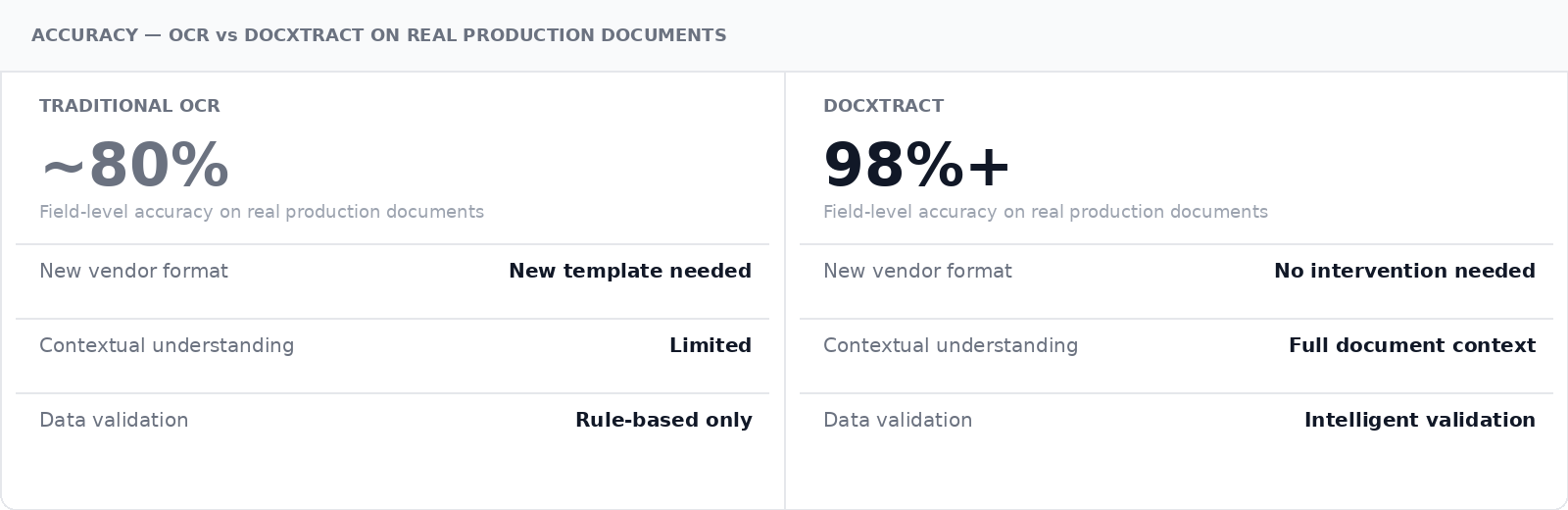
Every extraction error carries downstream risk: a wrong account number in a payment run, a misread quantity on a purchase order, an incorrect field on a compliance document. In regulated industries, these are not data quality issues. They are audit findings.
The local variation problem
Even when accuracy and adaptability are solved, most tools struggle with a third dimension: local variation. Document formats are not universal. An invoice issued in Germany looks different from one issued in India, which looks different from one issued in the UAE. A customs declaration filed in Singapore follows different field structures than one filed in Brazil. A tax document under GST operates differently from one under VAT or a sales tax regime.
These differences are not superficial. They reflect distinct regulatory frameworks, different mandatory fields, different validation rules, and different document hierarchies. A GST invoice in India must carry a GSTIN, HSN codes, and an IRN reference from the e-invoicing portal. A VAT invoice in the UK carries different mandatory fields under HMRC requirements. A bill of lading in a cross-border shipment may need to comply with the rules of multiple jurisdictions simultaneously. A purchase order in a country with strict transfer pricing rules carries tax significance that the same document in another country would not.
Generic IDP tools trained on a narrow slice of document types from a handful of geographies do not handle this variation well. It is not about supporting more document templates. It is about understanding the regulatory context each document exists in, validating fields against the right rules, and knowing when something is missing or inconsistent.
Local variation is not an edge case. For enterprises operating across geographies, it is the everyday reality. Any IDP solution that treats it as a configuration problem will produce exceptions faster than it eliminates them.
DocXtract is AI-powered to handle this complexity. It understands document context across geographies and regulatory regimes, validates extracted fields against the rules that apply to that document type, and maintains accuracy across format variation without manual template management.
Deployment is the real bottleneck
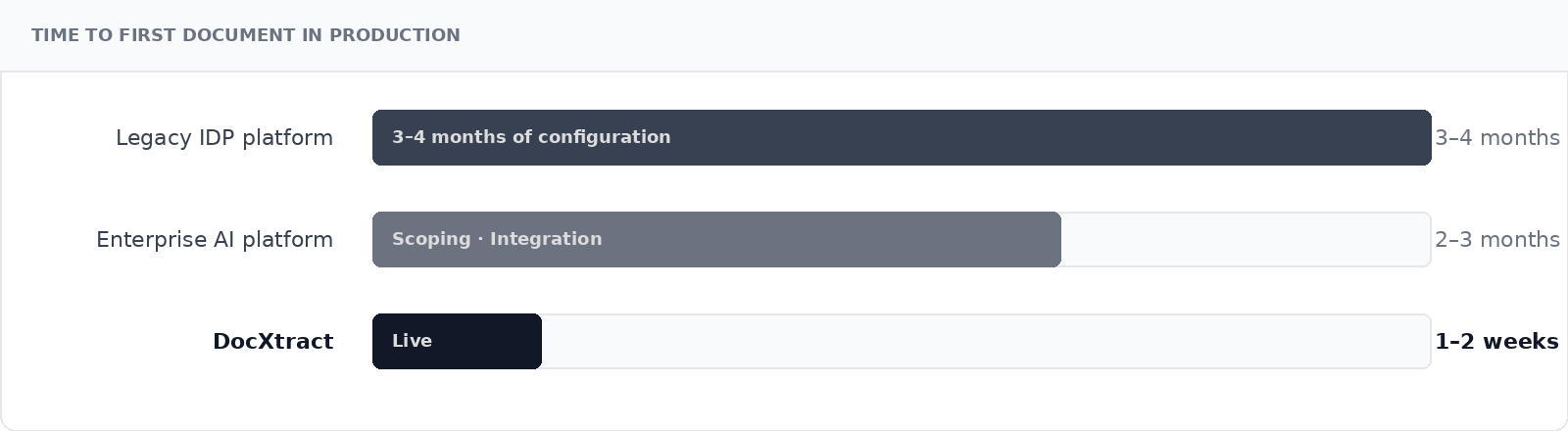
A typical enterprise IDP project, from vendor selection to go-live, takes three to four months on a legacy platform. Even modern enterprise AI implementations rarely go live in under two months. That is not a technology problem. It is an integration and configuration problem. DocXtract ships with pre-built connectors to SAP, Oracle, Finacle, Temenos, UiPath, and Power Automate. Most integrations are live in days, not months.
What a genuine solution looks like
A document processing solution that genuinely solves the problem needs to clear a specific bar.
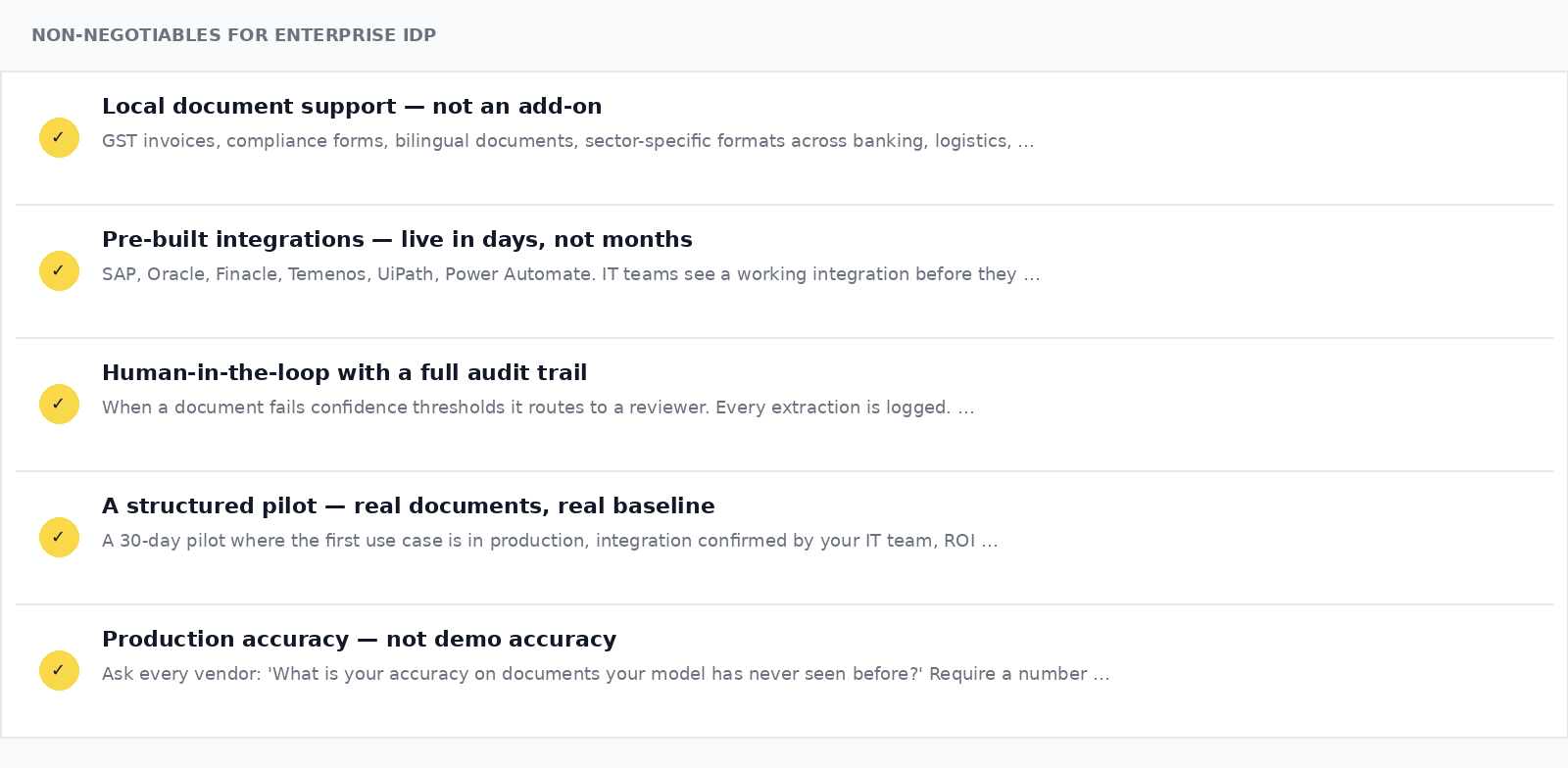
- Local document support — not an add-on. GST invoice structures, compliance forms, bilingual documents, sector-specific formats across banking, logistics, manufacturing, and healthcare. Purpose-built for real-world complexity, not a generic model with regional language support bolted on.
- Pre-built integrations — live in days, not months. SAP, Oracle, Finacle, Temenos, UiPath, Power Automate. IT teams see a working integration before they approve the product, not after.
- Human-in-the-loop with a full audit trail. When a document fails confidence thresholds, it routes to a reviewer with relevant fields flagged. Every extraction is logged. Regulators require this and most AI tools cannot provide it.
- A structured pilot — real documents, real baseline. Not a proof of concept on clean sample documents. A 30-day pilot where the first use case is in production, the integration is confirmed by your IT team, and ROI is measured against your actual current cost.
- Production accuracy — not demo accuracy. Ask every vendor this: "What is your accuracy on documents your model has never seen before, from a vendor format you have never trained on?" If they cannot answer with a number from real deployments, that is your answer.
The window is closing
For years, document processing was treated as a cost of doing business. Organisations budgeted for the headcount, built processes around manual review, and accepted the error rates as unavoidable.
That calculus is changing. Regulatory pressure on compliance documentation is increasing across every sector — from KYC and AML in financial services to traceability requirements in manufacturing and logistics. Talent costs for back-office processing roles are rising. And competitors who have solved the document bottleneck are turning around loan approvals, customs clearances, and vendor onboarding in hours while others take days.
The enterprises that solve this problem in the next two years will carry an operational advantage that compounds. Manual document processing is not a transitional phase. It is a bottleneck that prevents every other automation investment from delivering its full value. An RPA workflow that automates the downstream process cannot run if the upstream document still has to be read by hand.
By 2026, the majority of back-office document workflows in large enterprises will be assisted by AI-driven IDP. The question is not whether this will happen — it is whether your organisation will be ready when it does.
FAQ
Why are enterprises still struggling with document processing despite investing heavily in automation?
Most enterprise automation initiatives automate workflows, approvals, and downstream systems — but the document itself still remains manual. Invoices, KYC forms, onboarding files, shipping documents, and compliance paperwork continue to require human intervention because traditional OCR tools fail when formats vary. This creates the biggest bottleneck in enterprise automation.
Why do OCR-based document processing systems fail in real-world enterprise environments?
Traditional OCR tools depend heavily on templates and fixed rules. The moment a vendor changes an invoice layout or a new document format appears, extraction accuracy drops significantly. Enterprises then spend time maintaining templates, correcting extraction errors, and manually validating documents — defeating the purpose of automation.
How is AI-powered IDP different from traditional OCR?
OCR can only read text from documents. AI-powered Intelligent Document Processing understands document context. It can identify whether a number represents a tax code, invoice amount, account number, or reference ID based on surrounding business context, making extraction significantly more accurate and adaptable to unseen document formats.
Why is integration considered one of the biggest challenges in document automation?
Many IDP solutions focus only on extracting data but fail to integrate deeply with enterprise systems like SAP, Oracle, Finacle, Temenos, or automation platforms. Without seamless integration, teams still manually move data between systems, simply shifting the bottleneck rather than eliminating it.
Why is solving document processing becoming critical for enterprise competitiveness?
Manual document processing slows down invoice approvals, onboarding, compliance checks, and operational workflows. Enterprises that successfully automate document-heavy processes can significantly reduce turnaround times, improve operational efficiency, lower manual effort, and unlock the full value of their broader automation investments.